Hey Copilot, please predict sales for the next four weeks, net them by inventory and send required purchase orders to the vendors. Thank you!
Wow! This is a common wish of many of my customers, that employ dozen of buyers to analyze sales, predict and place orders every day.
Numbers from a real scenario:
- more than 30.000 different items moved in a month
- more than 1.000 different vendors
- more than 10 million Euro of purchases in a month
To keep the inventory as low as possible, the orders are made every day, within a weekly cycle, avoiding out of stock and overload of inbound department.
These customers are already using more or less sophisticated solutions to do this job, but the questions are:
- due of the amount of money moved every day, is it possibile to completely rely on AI agent?
- new AI tools (starting from Generative AI) can make these solutions more affordable and easier?
In short: is it possible to add a “Copilot button” in Business Central to do this with accuracy and for every customer? 😎
Privacy issues
During the last months, several compact LLM model were released and are ready to use also offline (for example Microsoft Phi-4 or Deepseek R1). Many colleagues, previously enthusiasts of Copilot and OpenAI, are now big fans 😇 of these models. Why?
Because customers are scared about privacy and raw company data, such sales, are one of the most reserved kind of information.
How many employees have free access to whole sales data?
When not to use Generative AI
This is the title of a very interesting article by Gartner: https://www.gartner.com/en/articles/when-not-to-use-generative-ai
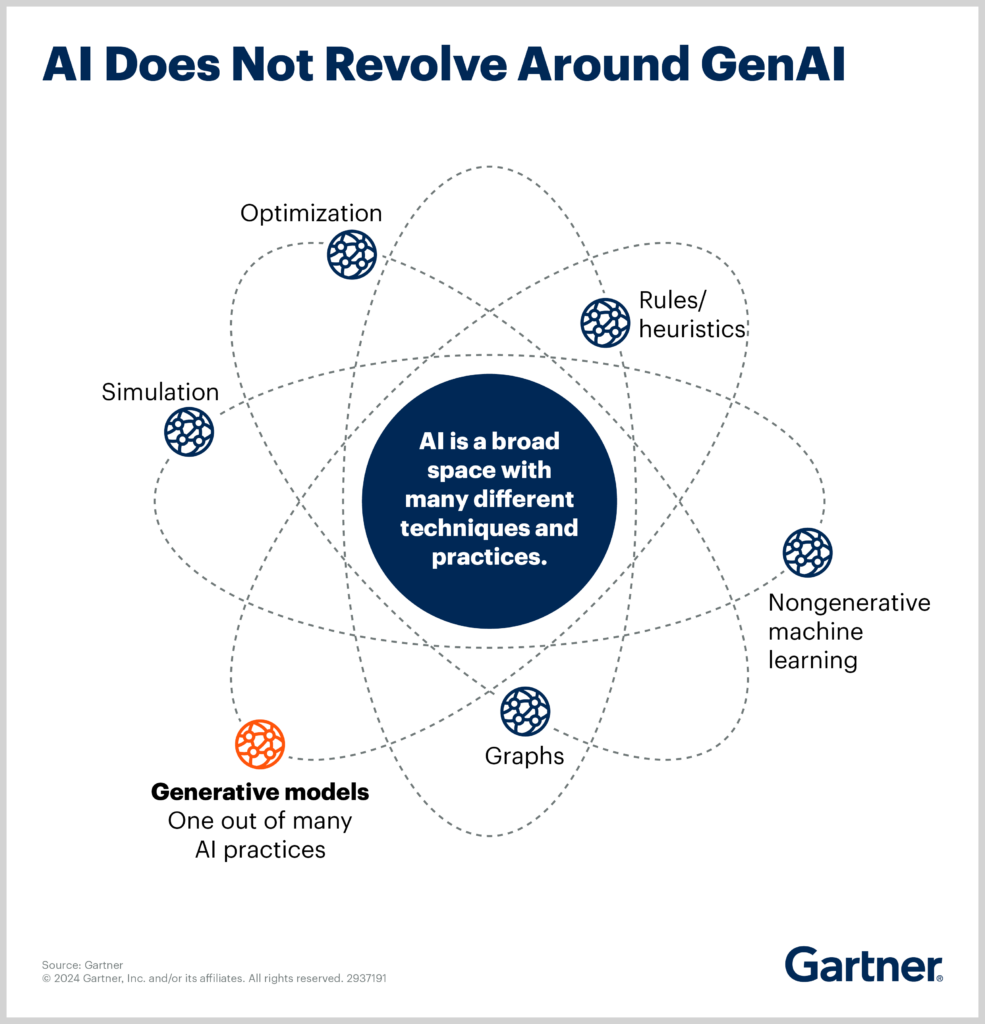
Misusing GenAI diminishes the value of AI in organizations.
Generative AI is only one piece of the much broader AI landscape, and most business problems require a combination of different AI techniques. Ignore this fact, and you risk overestimating the impacts of GenAI and implementing the technology for use cases where it will not deliver the intended results.
I completely agree! This picture is clarifying:
Also this other one:

Import / export data from ERP
In the previous posts we already discussed about importing and exporting data from ERP and, in particular, from Microsoft Dynamics Business Central. So, we can focus only on data processing.
Just a brief:
- Work “externally” to Business Central, uploading and downloading data through web services (API)
- Work “internally” using Actions or Job Queue, consuming third party API
For this example we use Python and both modes are supported:
- Consuming API with Requests (https://requests.readthedocs.io/en/latest/)
- Publishing API with Flask (https://flask.palletsprojects.com/en/stable/) or Tornado (https://www.tornadoweb.org/en/stable/)
Good old Machine Learning
Install PyTorch (https://pytorch.org/) and PyTorch Forecasting (https://pytorch-forecasting.readthedocs.io/en/stable/)
I started with both of these two great guides:
- Demand forecasting with the Temporal Fusion Transformer
https://pytorch-forecasting.readthedocs.io/en/stable/tutorials/stallion.html - PyTorch-Forecasting: Introduction to Time Series Forecasting
https://medium.com/@mnitin3/pytorch-forecasting-introduction-to-time-series-forecasting-706cbc48768
Prepare the dataset, in this forecast example: “Item no.”, “Time index”, “Missing sales (quantity)”, “Sales (quantity)”, “Week of the year”.
    raw_data = [
        ['0204594', 0, 1395.0, 550.0, '2'],
        ['0204594', 1, 2873.0, 487.0, '3'],
        ['0204594', 2, 130.0, 935.0, '4'],
        ['0204594', 3, 0.0, 632.0, '5'],
        ['0204594', 4, 0.0, 305.0, '6'],
        ['0204594', 5, 0.0, 434.0, '6'],
        ['0204594', 6, 54.0, 537.0, '7'],
        ['0204594', 7, 14.0, 632.0, '8'],
        ['0204594', 8, 106.0, 457.0, '9'],
        ['0204594', 9, 0.0, 217.0, '10'],
        ['0204594', 10, 0.0, 345.0, '10'],
        ['0204594', 11, 0.0, 527.0, '11'],
        ['0204594', 12, 0.0, 453.0, '12'],
        ['0204594', 13, 0.0, 471.0, '13'],
        ['0204594', 14, 0.0, 403.0, '14'],
        ['0204594', 15, 0.0, 43.0, '14'],
        ['0204594', 16, 0.0, 668.0, '15'],
        ['0204594', 17, 2.0, 585.0, '16'],
        ['0204594', 18, 19.0, 562.0, '17'],
        ...
💡 “Time index” is a numerical value that represents the weeks. Starting from zero for the first year, from 52/53 for the second year, 104/106 for the third year and so on…
💡 “Missing sales (quantity)” are very important to enrich the data for the neural network. If “Sales (quantity)” goes to zero due out of stock, in that weeks we lost the data to predict! The powerful of neural networks is to create links and find connections between data and predict using these hidden informations.
💡 “Week of the year” is also important to enrich model for seasonal requests.
Create the training model:
    # load raw data in a Pandas Data Frame
    data = pd.DataFrame(raw_data, columns=['item_no', 'time_index', 'missing_sales', 'sales', 'week'])

    # test prediction on 4 weeks
    max_prediction_length = 4

    # use whole dataset for training
    max_encoder_length = len(raw_data)
    training_cutoff = data['time_index'].max() - max_prediction_length

    training = TimeSeriesDataSet(
        data[lambda x: x.time_index <= training_cutoff],
        time_idx='time_index',

        # the column to predict
        target='sales',
        group_ids=['item_no'],
        min_encoder_length=max_encoder_length // 2,
        max_encoder_length=max_encoder_length,
        min_prediction_length=1,
        max_prediction_length=max_prediction_length,

        # list of categorical variables that change over time and are known in the future,
        # entries can be also lists which are then encoded together
        # (e.g. useful for special days or promotion categories)
        time_varying_known_categoricals=['week'],
        time_varying_known_reals=['time_index'],
        time_varying_unknown_categoricals=[],

        # list of continuous variables that change over time and are not known in the future.
        # you might want to include your target here.
        time_varying_unknown_reals=['sales', 'missing_sales'],
        target_normalizer=GroupNormalizer(
            groups=['item_no'], transformation='softplus'
        ),

        # dictionary of variable names mapped to list of time steps by which the variable should be lagged.
        # Lags can be useful to indicate seasonality to the models. If you know the seasonalit(ies) of your data,
        # add at least the target variables with the corresponding lags to improve performance.
        lags={'sales': [1,2,3,4]},
        add_relative_time_idx=True,
        add_target_scales=True,
        add_encoder_length=True,
    )

    validation = TimeSeriesDataSet.from_dataset(training, data, predict=True, stop_randomization=True)
💡 This model was trained with a parapharmaceutical item used against the flu. So we used “lags” to enforce data of the previous 4 weeks.
Train the model:
    tft = TemporalFusionTransformer.from_dataset(
        training,
        learning_rate=0.03,
        hidden_size=16,
        attention_head_size=2,
        dropout=0.1,
        hidden_continuous_size=8,
        loss=QuantileLoss(),
        optimizer='ranger',
        log_interval=10,
        reduce_on_plateau_patience=4
    )

    early_stop_callback = EarlyStopping(monitor="val_loss", min_delta=1e-4, patience=10, verbose=False, mode="min")
    lr_logger = LearningRateMonitor()
    logger = TensorBoardLogger("lightning_logs")

    trainer = pl.Trainer(
        max_epochs=50,
        accelerator="cpu",
        enable_model_summary=True,
        gradient_clip_val=0.1,
        limit_train_batches=50,
        callbacks=[lr_logger, early_stop_callback],
        logger=logger
    )

    batch_size = 128
    train_dataloader = training.to_dataloader(train=True, batch_size=batch_size, num_workers=4)
    val_dataloader = validation.to_dataloader(train=False, batch_size=batch_size * 10, num_workers=4)

    trainer.fit(
        tft,
        train_dataloaders=train_dataloader,
        val_dataloaders=val_dataloader,
    )
💡 Above code runs on every personal computer using only the cpu. It can be boosted using dedicated gpu (“accelerator” property).
Training may take from seconds to hours 😅 but, once completed, can be saved to be used several times. Loading a pre-trained model also increase the speed of the future training update.
Here is the path of trained model:
best_model_path = trainer.checkpoint_callback.best_model_pathTrained model for one item and 2 years has a size of 1 MB. For 30.000 items we need several GB of space… 😅
At the end, load the trained model and do the prediction (this code plot a graph):
    best_tft = TemporalFusionTransformer.load_from_checkpoint(best_model_path)
    raw_predictions = best_tft.predict(data, mode="raw", return_x=True)
    best_tft.plot_prediction(raw_predictions.x, raw_predictions.output, idx=0, show_future_observed=True).show()

As you can see, the prediction is not linear! 😎
To get values programmatically:
    prediction = 0
    for tensor in raw_predictions.output.prediction[0]:
        # raw prediction has the same structure of input data
        # and "sales" is the column with index 3 (zero based)
        prediction += tensor[3]

    print(int(prediction))
The example dataset generates an output of 2.251 quantities predicted and it sounds good.
Ask to ChatGPT (or DeepSeek if you prefer…)
The same example dataset generates this output:
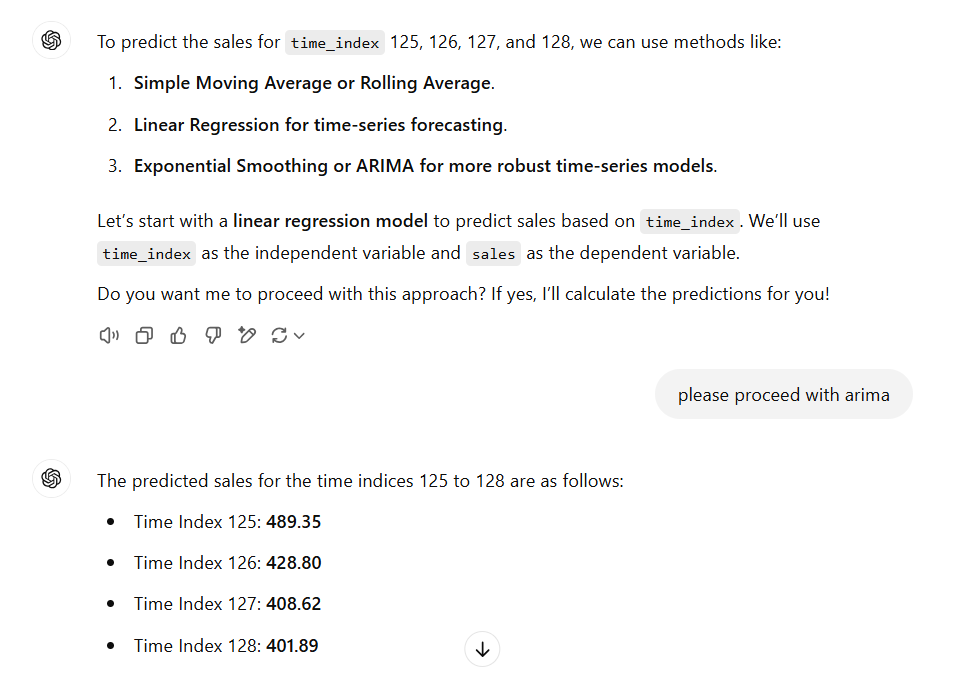
Total sales predicted 1.726: it seems too low.
Conclusion
As I said in previous posts, AI is a great opportunity to enhance our software and give honor to years of algorithm development!
Our mission is to find and implement new real business AI cases, using all AI tools and not only the “astonishing” GenAI.