“BC is slow, call the DBA!” I heard this sentence many and many times. So, can the DBA make the difference in Business Central performance issues?
In the Cloud: certainly no, because the database is not accessible.
On Premises: maybe. If “playing” with hardware, indexes and optimizations can give +10% of speed, “working” with code can boost +100% of speed! 😎
Real example: cumulative invoicing
One of my customer need to prepare and post its cumulative invoicing, every two weeks, about 400.000 invoice rows per cycle.
Desired duration: 3 hours. So, 3 hours equals 180 minutes equals 10.800 seconds, 10.800 seconds divided per 400.000 rows equals about 30 milliseconds per rows. Can BC reach this speed?
First attempt: failed! 😅 Estimated duration: more than 20 hours.
Reactions: “BC is slow, call the DBA!” 😅 “We made a mistake chosing BC” 😅 “@@$$$@####” 😅 and so on…
The old but gold Profiler
Inside every BC there is a great ally to analyze and solve a lot of performance issues.
Search for “Performance Profiler”, set a threshold of 50ms and press “Start”.

Now BC is recording your session and it’s taking the time for each AL metod called. Simply run the slow process!
When the process ended, press “Stop” and analyze the result.

In this example, about 75% of the time is consumed by the standard Microsoft Base Application. The source is sealed… so there is nothing to do.
“Dear customer, I’m sorry but you have to wait 20 hours.” Yes, I heard also that! 😅
Deep into the calls
The Profiler shows also the duration of each AL call and its name.
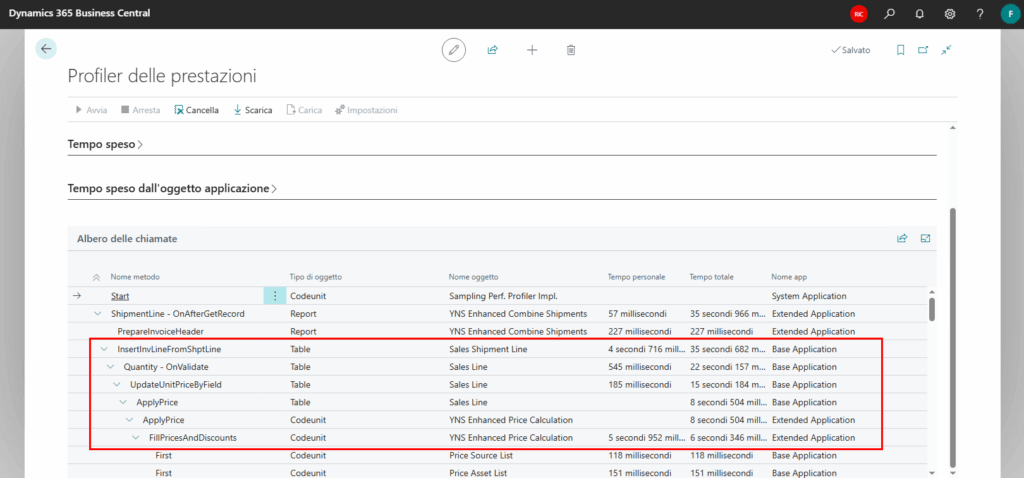
In the example, 99% of time taken by “InsertInvLineFromShptLine” is consumed by Quantity and Price validation. 🤨
Why BC standard wants to recalculate the price if we are invoicing from an order?
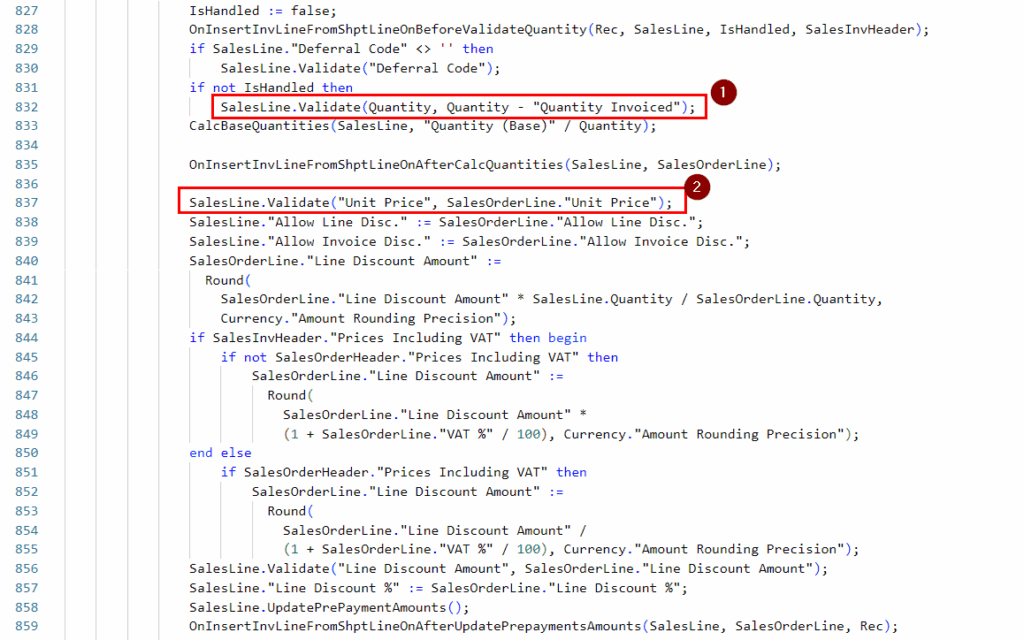
It seems wasted time! Validate the quantity, recalculate the price and, after of all, force the price from the order.
Another example, a lot of time consumed by “Sales Invoice Aggregator”. WTF is “Sales Invoice Aggregator”?! 😅
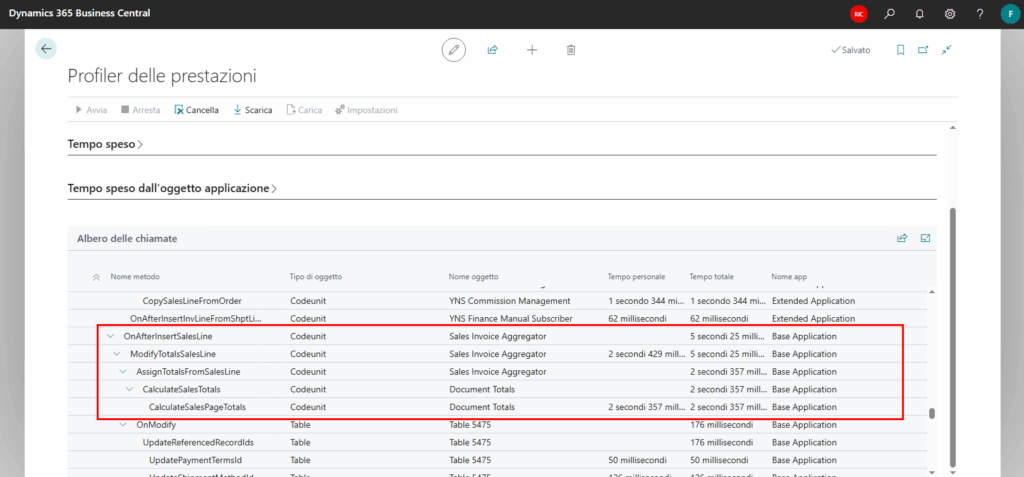
Do we need this stuff?
Remember that BC is a general purpose software, designed for many customer with different needs. Statisfy all is impossible and not all the customer are invoicing 400K rows every two weeks.
So, if you are brave 😅 you can analyze the Microsoft source code and decide to disable something that is not useful for your customer.
Let’s continue the example.
    var
        DisableAggregate: Codeunit "Disable Aggregate Table Update";
    ...
        BindSubscription(DisableAggregate);
        DisableAggregate.SetDisableAllRecords(true);
WOW! Someone thought how to disable the aggregator!
Let’s continue with more complexity. Define a manual subscriber codeunit.
codeunit 50000 "XYZ Bulk Invoicing"
{
    EventSubscriberInstance = Manual;

    var
        BulkInvoicing: Boolean;

    procedure SetBulkInvoicing()
    begin
        BulkInvoicing := true;
    end;
}
We need to validate the price? No, so disable it.
    [EventSubscriber(ObjectType::Table, database::"Sales Line", 'OnBeforeUpdateUnitPrice', '', false, false)]
    local procedure OnBeforeUpdateUnitPrice(var SalesLine: Record "Sales Line"; xSalesLine: Record "Sales Line"; CalledByFieldNo: Integer; CurrFieldNo: Integer; var Handled: Boolean)
    begin
        if BulkInvoicing then
            Handled := true;
    end;
We need to validate the quantity? No, disable it too.
    [EventSubscriber(ObjectType::Table, database::"Sales Shipment Line", 'OnInsertInvLineFromShptLineOnBeforeValidateQuantity', '', false, false)]
    local procedure OnInsertInvLineFromShptLineOnBeforeValidateQuantity(SalesShipmentLine: Record "Sales Shipment Line"; var SalesLine: Record "Sales Line"; var IsHandled: Boolean; var SalesInvHeader: Record "Sales Header")
    begin
        if BulkInvoicing then begin
            SalesLine.Quantity := SalesShipmentLine."Qty. Shipped Not Invoiced";
            SalesLine."Qty. to Ship" := SalesLine.Quantity;
            SalesLine."Qty. to Invoice" := SalesLine.Quantity;
            IsHandled := true;
        end;
    end;
Now, bind this new codeunit (like for the aggregator).
    var
        BulkInv: Codeunit "XYZ Bulk Invoicing";
    ...
        BindSubscription(BulkInv);
        BulkInv.SetBulkInvoicing();
Enjoy for the result!
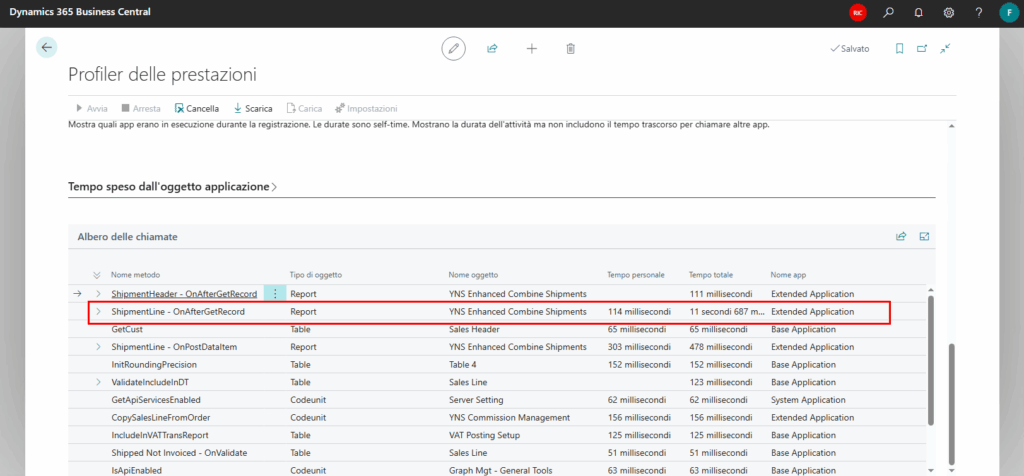
In this example, we started from 35 seconds for the sample and we ended with 11 seconds. -70% of duration or, if you prefer, +218% of speed!
Conclusion
In the Cloud era, without the access to the database and with sealed APPs, you need to know in depth the source code. In particular, the Microsoft Base Application should not have secrets.
The performance boost given by an optimized procedure is noticeably higher than any hardware or database improvement.